If-Else Statements
Every day, you make small decisions:
- If it is raining, take an umbrella.
- If the traffic signal is green, go. Else, wait.
- If you score above 90, you get an A grade. Else if above 75, a B grade. Else, a C grade.
Programs also need to make decisions like this. Until now, our code ran line by line, from top to bottom. With if-else statements, we can tell JavaScript to run some code only when a condition is true.
What Is an If-Else Statement?
An if-else statement checks a condition and runs a block of code based on whether the condition is true or false.
A condition is anything that gives true or false, usually a comparison like age >= 18.
There are four forms:
ifif...elseif...else if...else- Nested
if
1. The if Statement
Runs the code only if the condition is true. If it is false, JavaScript simply skips it.
Syntax:
if (condition) {
  // runs only when the condition is true
}
Example: checking the temperature
Output:
It's very hot! Drink plenty of water.
Have a nice day!
If temperature were 25, only Have a nice day! would be printed.
Key points:
- The condition always goes inside round brackets
( ). - The code to run goes inside curly braces
{ }. This is called a block.
2. The if...else Statement
Gives two paths: one for true, and one for false. Exactly one of them always runs.
Syntax:
if (condition) {
  // runs when true
} else {
  // runs when false
}
Example: voting eligibility
Output:
Sorry, you are too young to vote.
Example: even or odd
Think of it like a fork in the road. You can go left or right, but never both.
3. The if...else if...else Statement
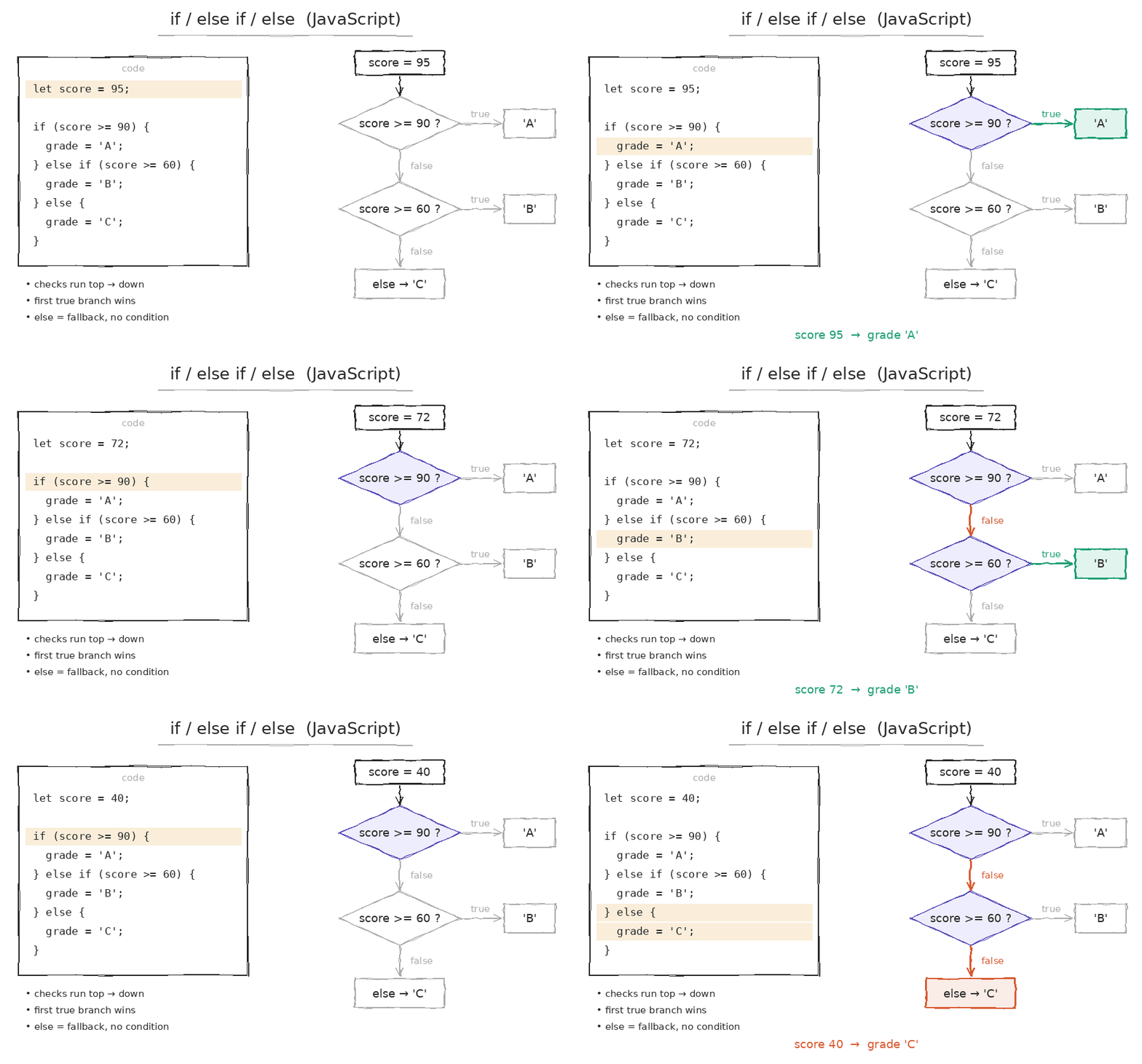
Used when there are more than two possibilities. JavaScript checks each condition from top to bottom and runs the first one that is true. The rest are skipped.
Syntax:
if (condition1) {
  // runs if condition1 is true
} else if (condition2) {
  // runs if condition2 is true
} else {
  // runs if nothing above is true
}
Example: exam grades
How JavaScript checks it:
marks >= 90 ?  → 82 >= 90 → false ❌  (skip)
marks >= 75 ?  → 82 >= 75 → true  ✅  (run and stop!)
marks >= 50 ?  → never checked
else           → never checked
Key points:
- You can add as many
else ifblocks as you need. - The final
elseis optional. It works as a default when nothing matches. - Order matters! Always put the most specific condition first.
❌ Wrong order:
Since 95 >= 50 is true, JavaScript stops there and prints Grade C. Always check higher values first.
4. Nested if Statements
You can put an if inside another if. The inner check happens only if the outer condition is true.
Example: ATM withdrawal
Key point: Too much nesting makes code hard to read, like a box inside a box inside a box. Often, you can combine conditions using logical operators instead:
if (hasCard && pinCorrect && balance >= amount) {
  console.log("Please collect your cash 💵");
}
Combining Conditions with Logical Operators
You can check multiple conditions in one if using &&, ||, and !.
&& (AND): all conditions must be true
|| (OR): at least one must be true
! (NOT): reverses the condition
Truthy and Falsy Values in Conditions
The condition does not always need to be a comparison. JavaScript converts any value into true or false.
Remember the falsy values from the Type Casting lesson: false, 0, "", null, undefined, NaN. Everything else is truthy.
Since "" (an empty string) is falsy, the else block runs.
Short Way: The Ternary Operator
For simple if-else decisions that pick a value, you can use the ternary operator from the Operators lesson:
let age = 20;

// Using if-else
let status;
if (age >= 18) {
  status = "Adult";
} else {
  status = "Minor";
}

// Using ternary (same result, one line)
let status2 = age >= 18 ? "Adult" : "Minor";
Use the ternary for short decisions, and if-else for bigger logic.
Common Mistakes to Avoid
❌ Mistake 1: Using = instead of ===
= stores a value. === compares values.
❌ Mistake 2: Adding a semicolon after if
if (age >= 18); {                 // ❌ the semicolon ends the if here!
  console.log("You can vote");    // always runs
}
Never put ; right after the if (...).
❌ Mistake 3: Skipping curly braces
if (age >= 18)
  console.log("You can vote");
  console.log("Welcome!");   // ⚠️ always runs, it is NOT part of the if!
Without { }, only the first line belongs to the if. Always use curly braces, even for a single line.
❌ Mistake 4: Putting else without if
else {
  console.log("Hello");   // ❌ SyntaxError
}
An else must always come right after an if block.
Quick Summary Table
| Form | When to use | Paths |
|---|---|---|
if | Do something only if true | 1 |
if...else | Choose between two options | 2 |
if...else if...else | Choose among many options | Many |
Nested if | Check one condition inside another | Many |
Ternary ? : | Short, one-line decisions | 2 |
Key Takeaways
- If-else statements help JavaScript make decisions based on conditions.
ifruns code only when true, andif...elsepicks between two paths.if...else if...elsehandles many choices. It runs the first true one, so order matters.- Combine conditions using
&&,||, and!, and remember that truthy/falsy values also work as conditions. - Always use
===(not=) and always use curly braces{ }to avoid bugs.