What Is a Data Type?
A data type tells JavaScript what kind of value you are working with.
Why does this matter? Because different kinds of data behave differently:
The same + sign gives different results, because the data type is different.
In JavaScript, you don't have to mention the type yourself. JavaScript figures it out from the value. This is called being dynamically typed.
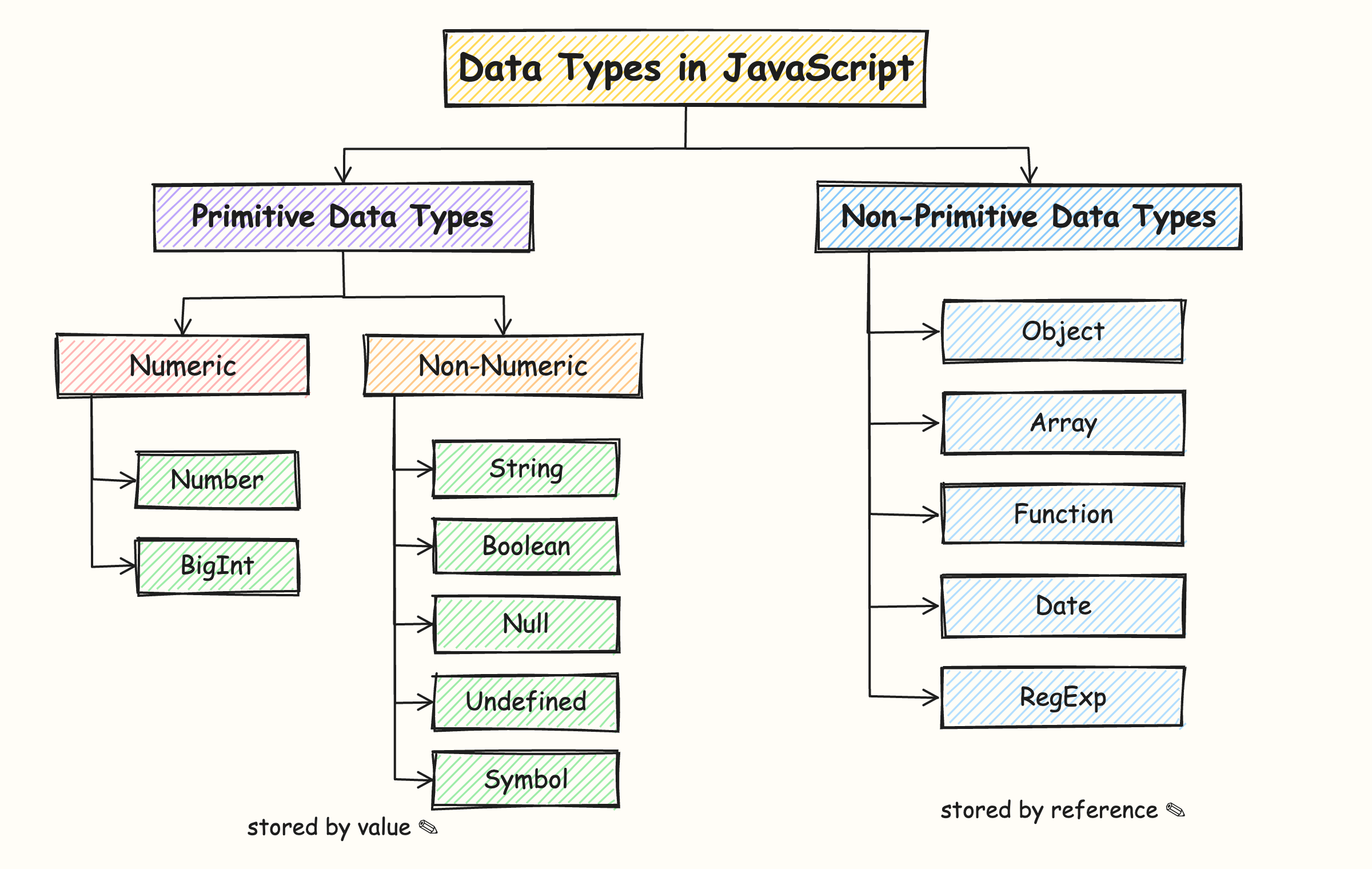
JavaScript data types are divided into two groups:
Primitive data types: simple, single values
- Numeric
NumberBigInt
- Non-Numeric
StringBooleanNullUndefinedSymbol
Non-primitive data types: collections of values
ObjectArrayFunctionDateRegExp
Part 1: Primitive Data Types
Primitive types hold one simple value. There are 7 of them.
1. Numeric
1.1. Number: for all numbers
JavaScript uses one type for both whole numbers and decimal numbers.
Key points:
- No separate types for whole numbers and decimals. Everything is
number. - Used for maths:
+,-,*,/. - There are two special number values:
Infinity, for example10 / 0NaN(Not a Number), which comes from a wrong calculation, like"abc" * 2
1.2. BigInt: for very large numbers
The normal number type can only store whole numbers accurately up to about 9 quadrillion. For bigger numbers, we use BigInt by adding n at the end.
Key points:
- Add
nat the end of the number to make it a BigInt. - Used in banking, science, and cryptography.
- As a beginner, you will rarely need it.
2. Non-Numeric
2.1. String: for text
A string is any text written inside quotes.
Key points:
- You can use double quotes
" ", single quotes' ', or backticks` `. - Backticks let you put variables inside text using
${ }. - Anything inside quotes is text, even numbers.
"25"is a string, not a number. - You can find the length of text with
.length:
2.2. Boolean: for yes or no
A boolean has only two possible values: true or false.
Key points:
- Used for making decisions in your program.
- Comparisons always give a boolean:
- Think of it like a light switch: it is either ON or OFF.
2.3. Null: empty on purpose
null means "no value," and you set it deliberately.
let selectedSeat = null; // no seat chosen yet
Key points:
- You set
nullyourself. JavaScript never sets it automatically. - It is used to clearly show that something is empty.
2.4. Undefined: value not given yet
When you create a variable but don't put anything in it, its value is undefined.
Key points:
- JavaScript sets
undefinedautomatically. - It means "this variable exists, but has no value yet."
- Like a new notebook with a name on the cover but empty pages.
Undefined vs Null, a simple example:
| Meaning | Who sets it? | |
|---|---|---|
undefined | You forgot to fill the form | JavaScript |
null | You left the field blank on purpose | You |
2.5. Symbol: for unique values
A Symbol creates a value that is always unique, even if two symbols have the same description.
Key points:
- No two symbols are ever equal.
- Used in advanced code to create hidden or unique keys.
- You can skip it for now and learn it later.
Important Feature of Primitives: They Are Copied
When you copy a primitive value, JavaScript makes a separate copy. Changing one does not change the other.
It is like making a photocopy of your marksheet. If you write on the photocopy, the original stays clean.
Part 2: Non-Primitive Data Types
Non-primitive types can store many values together. They are also called reference types.
2.1. Object: for related details
An object groups related information using key–value pairs.
Key points:
- Written inside curly braces
{ }. - Each item has a key (label) and a value.
- Values can be any type: string, number, boolean, even another object.
- Access values using a dot:
mobile.brand. - Like an Aadhaar card: one card with many details, such as name, date of birth, and address.
2.2. Array: for a list of items
An array stores a list of values in order.
Key points:
- Written inside square brackets
[ ]. - Each item has a position number called an index.
- Counting starts from 0, not 1! So
subjects[0]is the first item. - Can store any type of values.
- Like a shopping list: items written one after another.
2.3. Function: for reusable code
A function is a block of code that does a task. You can use it again and again.
Key points:
- Write once, use many times.
- In JavaScript, functions are also a type of object.
- Like a pressure cooker: put in the ingredients (inputs) and get the food (output).
- We will learn functions in detail in a later lesson.
2.4 Date: for working with dates and time
A Date object represents a specific date and time and provides methods to work with them.
Key points:
- Created using the
new Date()constructor. - Stores a specific point in time.
- Provides methods to get or modify the
year,month,day,hours, and more. getMonth()returns the month from0 to 11, so+ 1is commonly used to get the actual month number.- Like a calendar and clock: it helps you work with dates and time in your application.
2.5 RegExp: for matching patterns in text
A RegExp (Regular Expression) represents a pattern used to search, match, or replace text.
Key points:
- Written between forward slashes:
/pattern/. - Used to search, match, validate, or replace text.
test()checks whether the pattern exists in a string and returnstrueorfalse.- Flags such as
imake matching case-insensitive. - Like a search pattern: it helps you find specific text patterns inside a larger piece of text.
Important Feature of Non-Primitives: They Are Shared
When you copy an object or array, JavaScript does not create a new copy of the data. Instead, both variables refer to the same object or array in memory. Therefore, changes made through one variable are also reflected in the other.
It is like sharing a Google Doc. If your friend edits it, you see the change too, because there is only one document.
Primitive vs Non-Primitive: Quick Comparison
| Point | Primitive | Non-Primitive |
|---|---|---|
| Stores | One single value | Many values together |
| Examples | string, number, boolean, undefined, null, bigint, symbol | object, array, function |
| Copying | Makes a separate copy | Shares the same data |
| Can be changed directly? | No, you replace the value | Yes, you can change the contents |
| Real-life example | Photocopy of a page | Shared Google Doc |
Checking the Type with typeof
Not sure what type a value is? Ask JavaScript using typeof:
Two things to remember:
typeof nullshows"object". This is an old mistake in JavaScript that was never fixed.- Arrays show
"object". To check for an array, useArray.isArray([1, 2]), which returnstrue.
Key Takeaways
- A data type tells JavaScript what kind of value it is, and JavaScript detects it automatically.
- There are 7 primitive types: string, number, boolean, undefined, null, bigint, and symbol. Each holds one simple value.
- Non-primitive types, like objects, arrays, and functions, store many values together.
- Primitives are copied, while non-primitives are shared. This is the biggest difference between the two groups.